Stop pasting netlists. Give Claude real access to your Altium project.
/ 10 min read
Table of Contents
Hardware design has been slow to integrate with AI. Not because the AI isn’t capable, it’s because the CAD environments hardware engineers use every day are closed systems. There’s no file system to read, no API to call, no standard interface that lets an LLM actually see what you’re building.
Software engineers use tools like Claude Code, Cursor, etc to read local files, trace function calls across a codebase, understand project structure, and work alongside you in real time. Like pair programming with someone who’s already read all the code.
Hardware engineers don’t have reliable equivalents yet. You’re working in Altium Designer and the AI lives in a completely separate window, knowing nothing about your actual design. This is my attempt to bridge that gap.
Will this always be necessary? Probably not. Models are improving fast, context windows are growing, reasoning is getting better, and maybe one day you’ll describe a circuit and Claude will just get it. But that day isn’t today. And in the meantime, building structured workflows means you’re not waiting. When models do improve, the tooling only gets better alongside them.
How did we get here
Before building this, I tried a bunch of things.
Uploading the netlist to Claude. This seemed like the obvious move, export the netlist, paste it in, ask questions. For small circuits it actually works. For anything real, it breaks. A complex multi-sheet design produces a netlist that floods the context window. Claude loses the thread, misses cross-sheet connections, and starts confidently answering questions about components it can no longer see. The problem isn’t Claude, it’s that a raw text dump is the wrong interface for a tool built to reason, not scan.
Existing AI tools for Altium. Tools exist. The most capable connect Claude to Altium via Delphi scripting (the Win32 automation layer Altium exposes for add-ons). It’s the right idea but the architecture has been brittle in my experiments. Delphi scripting breaks across Altium versions, requires complex setup, and puts fragile Win32 machinery between Claude and your data. High overhead for something that should be straightforward.
Just asking Claude anyway. Sometimes you can get useful answers without any tooling, describe the circuit, explain the problem, ask for feedback. But you’re doing all the work. You’re framing every question, providing every piece of context, filling every gap. The AI responds when prompted. That’s a chatbot. What I wanted was something that would push back, ask questions I hadn’t thought of, and flag things before I noticed them.
What a Real Co-Pilot Looks Like
I kept coming back to a framing I’d seen in Garry Tan’s gstack, the idea that giving AI a structured specialist role produces dramatically better results than a single generic assistant. The role changes based on what you need. The AI is the same underneath.
That’s what hardware engineers need. Not a chatbot that answers circuit questions. A co-pilot that understands your specific design, in the context of your live project, and shifts into a specialist role when you need it to.
altium-copilot is my attempt to build that. It’s the first tool in a suite I’m calling ee-in-a-box, open-source tools that would give hardware engineers the same kind of AI enablement software engineers already have.
How it connects. altium-copilot is an MCP server (Model Context Protocol), the open standard Anthropic built for giving LLMs structured access to external tools and data. Install it and your Claude Desktop or Claude Code session gets real-time read access to your open Altium project. Claude can see your netlists, your components, your variants, your active schematic sheet. It knows your specific design.
Open PowerShell and run:
irm https://raw.githubusercontent.com/ee-in-a-box/altium-copilot/main/install.ps1 | iexPrivacy. The server runs locally. It doesn’t log anything or phone home. All your schematic data goes only to Claude via your own Pro or Enterprise subscription, the same place everything else in your Claude session goes. Your IP stays yours.
How It Works
The first design decision was how to get data out of Altium.
The Delphi scripting path reaches into Altium’s running process via Win32 APIs. altium-copilot takes a different approach: read Altium’s own output files directly.
When you save a schematic, Altium writes three file types that contain everything you need:
- The netlist: Every net, every pin, cross-sheet connections already resolved by Altium’s own compiler
- The project file: Sheet paths, variant definitions, DNP component lists per variant
- Individual sheets: Component placements, pin definitions, MPNs, descriptions, values
altium-copilot watches these files. When you save in Altium, the server picks up the change automatically. No Delphi. No Win32. No fragile scripting layer between Claude and your data.
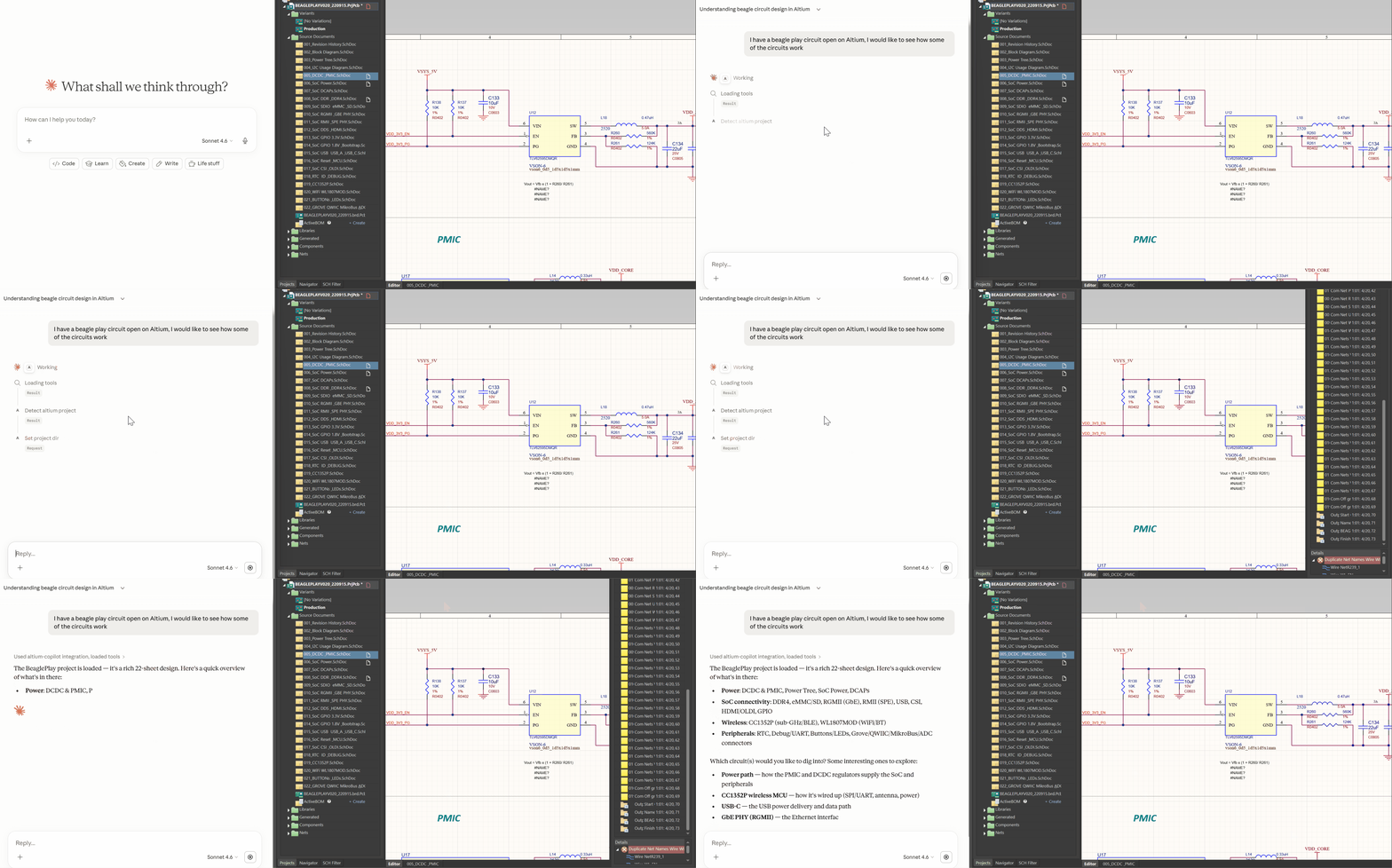
What Claude can do with this:
| Ask Claude… | What happens |
|---|---|
| ”What’s connected to the 3V3 rail?” | Traces the net across all sheets, returns every pin |
| ”What does U12 do?” | Pulls component identity: MPN, description, named pins, connected nets |
| ”What’s different in Prototype variant?” | Compares DNP lists between variants |
| ”Find anything related to battery charging” | Keyword search across components and nets |
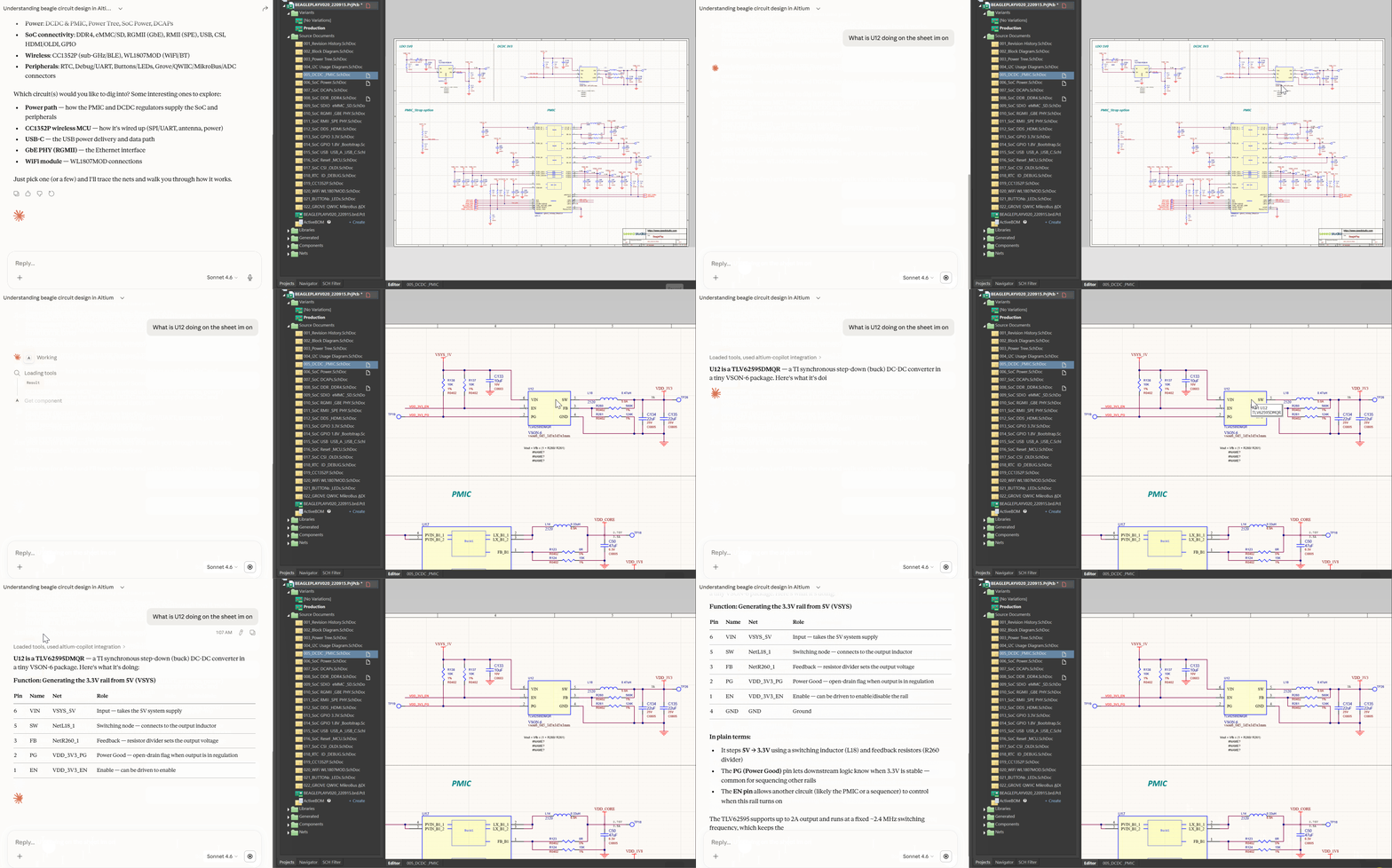
Variant awareness is worth calling out specifically. If your project has a Prototype with certain components marked DNP, Claude knows that. It won’t tell you a component is connected if it’s not populated in the variant you’re working in.
The server also surfaces an update notice automatically if a newer version of altium-copilot is available, no need to check manually.
The Specialist Modes
Now to the interesting part, giving AI a structured specialist role produces dramatically better results than a generic assistant. Two specialist modes ship with altium-copilot. You don’t invoke them with a command, Claude reads what you say and shifts into whichever fits.
| Mode | Triggers when you say… | What happens |
|---|---|---|
schematic_review | ”review this”, “is this correct?”, “check my power supply” | Claude reads datasheets and confirms its understanding before flagging anything. Every finding cites a datasheet value or a netlist fact. Report saved to markdown. |
brainstorm_circuits | ”I want to add a new circuit”, “how would I improve this?”, “what power supply topology should I use here?” | Reads your loaded schematic first, then asks one question at a time, problem, constraints, topologies with tradeoffs, checks your existing design before recommending anything new. |
schematic_review
Say “review my schematic” or “check this circuit” and Claude shifts into a structured audit. It reads your datasheets, tells you what it thinks the circuit does, and asks you to confirm before flagging anything. Every finding traces to a datasheet value or something measurable in the netlist, no speculation.
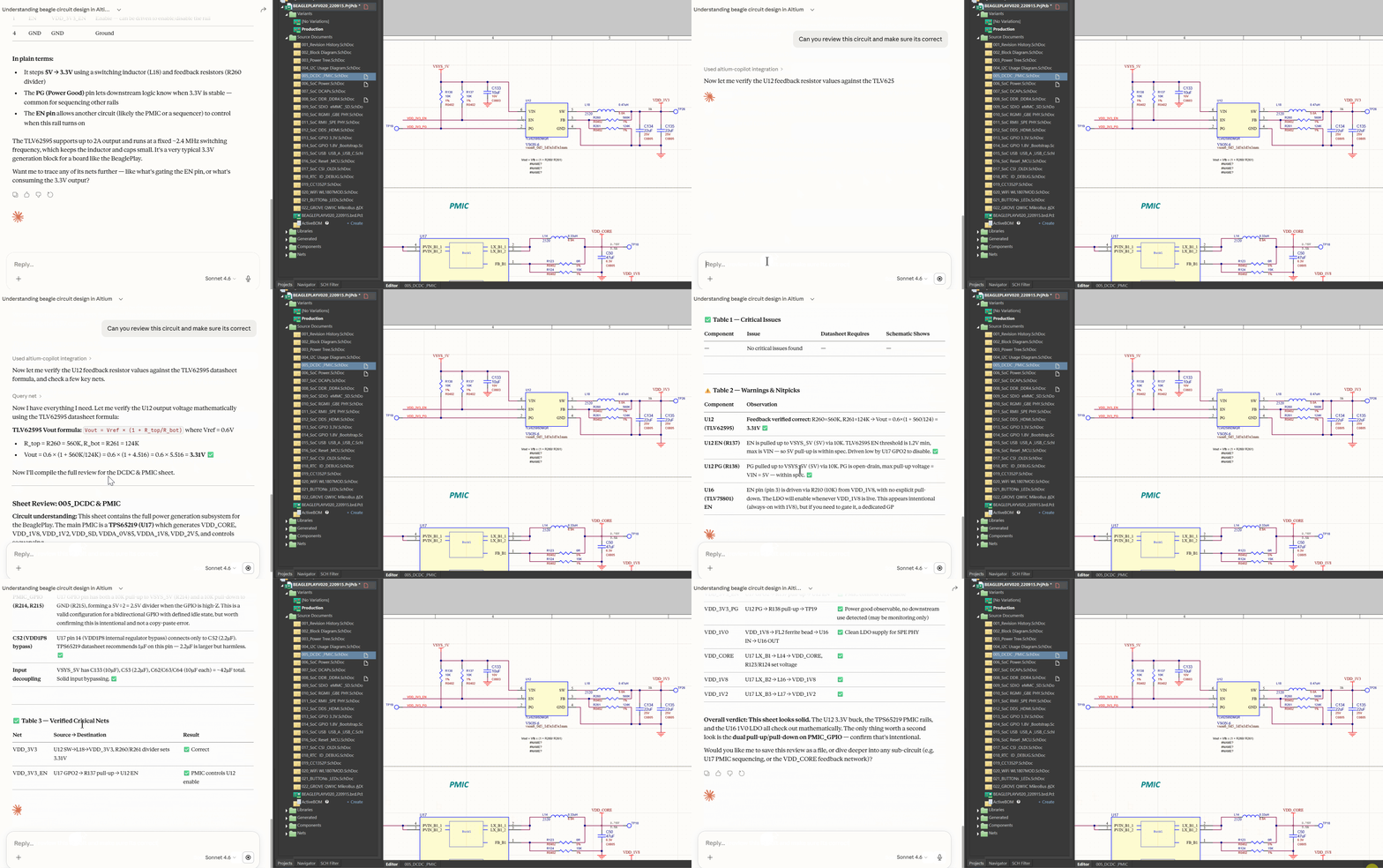
Most AI review tools skip the understanding step and go straight to critique. That’s how you get hallucinated issues based on misunderstood circuits.
How it works under the hood
Phase 1 — Understand before you judge. Claude reads the schematic, looks up component datasheets, and states explicitly what it believes the circuit does and what the key operating parameters are. It asks you to confirm or correct before proceeding. No findings yet, just understanding.
Phase 2 — Audit. Every finding must trace to a datasheet value or a measurable netlist fact. No speculation. Claude checks pin assignments against the datasheet application circuit, verifies passive values produce the correct operating parameters per datasheet formulas, follows critical signals source-to-destination, and checks cross-sheet nets for unexpected appearances.
Phase 3 — Document. Findings come out as three structured tables: critical issues with datasheet citations, warnings and nitpicks, and verified critical nets. The report is saved as a markdown file in your project directory.
brainstorm_circuits
Say “help me design a power supply for this” and Claude becomes a structured design partner. If your project is loaded it reads the relevant sheets before asking you anything, then works through problem, constraints, and topology options one question at a time.
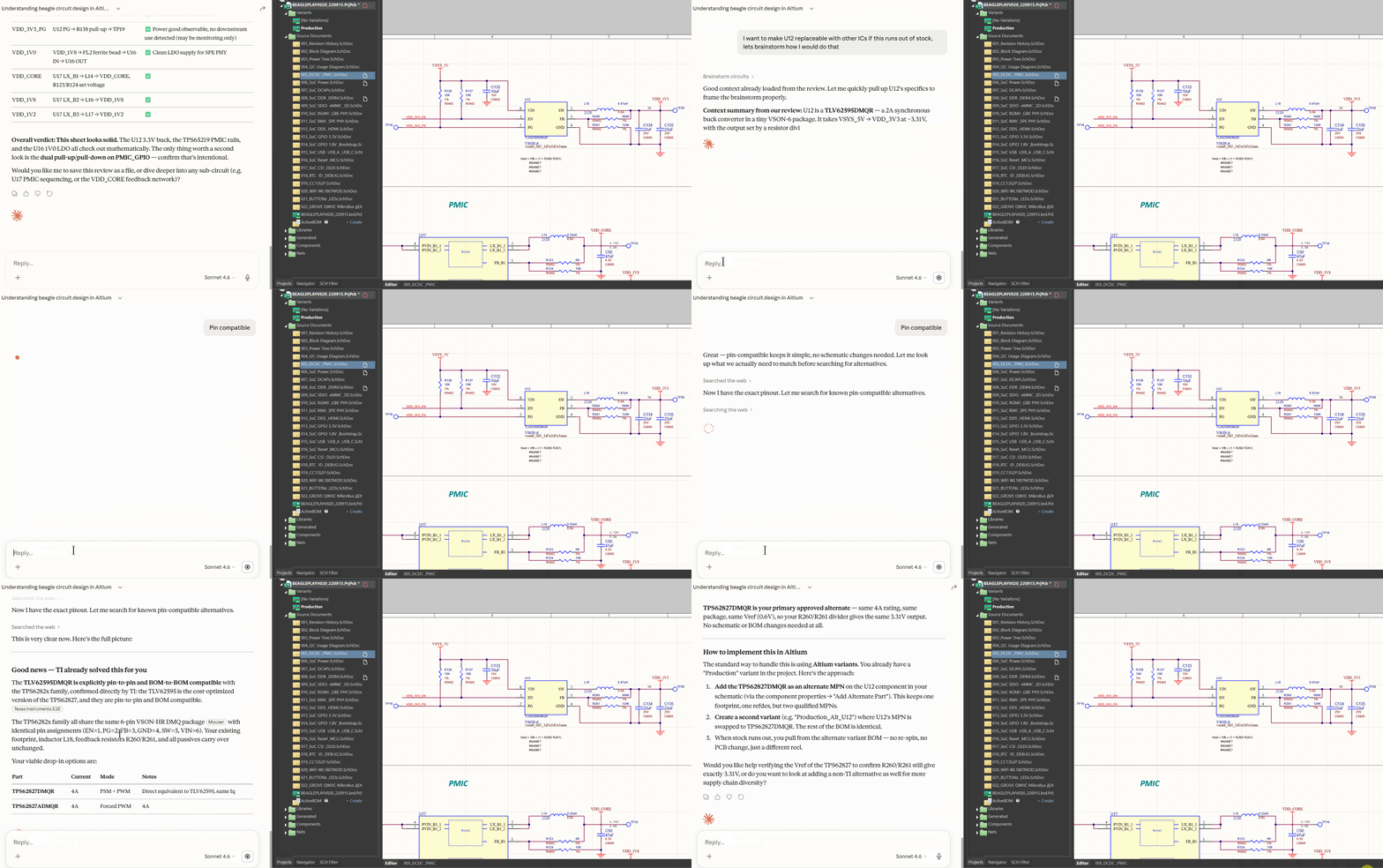
Before you commit to anything, it searches your loaded design to see if you already have what you need. A chatbot suggests a buck converter. This checks whether you already have one.
How it works under the hood
Phase 0 — Context. If your project is loaded, Claude reads the relevant sheets before asking you anything. It shows up already knowing what’s in the design.
Phase 1 — Problem statement. One question: what does this circuit need to do? No topology assumptions yet.
Phase 2 — Constraints. One question at a time. Claude figures out which specs would most change its recommendation and asks about them until it has enough to propose meaningful options. States its assumptions explicitly before moving on.
Phase 3 — Topologies. 2-3 options. Leads with the simplest viable choice. For each: name, tradeoffs, one reason to pick it, one reason to skip it.
Phase 4 — Fit check. Before you commit to anything, Claude searches your actual loaded design for components or nets that might already serve this role. If you already have a regulated 3.3V rail, it knows. If there’s a similar sub-circuit on another sheet, it finds it.
Phase 5 — Summary. Topology chosen, specs agreed, suggested components with reasoning, open questions before layout begins.
Inspired by the brainstorming skill from obra/superpowers, adapted for circuit design.
What’s Next
PCB layout understanding is next, same live-access model extended to the board layer. After that I want to build out the ee-in-a-box suite with modes I kept wishing existed while doing hardware work: a cross-functional engineer mode for sharing designs with people who don’t have Altium, a simulation guide, a component librarian that flags stale or discontinued parts before they make it into a BOM, and supply chain awareness grounded in real part data.
How i'm thinking of structuring these roles
XFN Engineer — altium-copilot without the Altium license requirement. Works from a static netlist export, shareable with firmware, mechanical, or systems engineers who need to understand the design but don’t have live Altium access.
Simulator — a mode that walks you through simulating and validating your design. Helps you set up the right simulation for your circuit type, interpret results, and iterate until the design is validated before you spin a board.
Librarian — periodic audits of your component libraries. Flags stale, discontinued, or inconsistent entries before they propagate into a BOM or a build.
Supply Chain Expert — deep dive into component availability, lead times, alternatives, and sourcing risk. Grounded in real part data, not general knowledge.
The suite is open source. If you have ideas, found a bug, or want to contribute, I’d love to hear from you.
Try It
Requirements: Windows, Altium Designer running with a project open, Claude Desktop or Claude Code (Pro or Enterprise subscription).
Open PowerShell and run:
irm https://raw.githubusercontent.com/ee-in-a-box/altium-copilot/main/install.ps1 | iexOpen Altium with your project loaded. Open Claude. Start asking.